How to Shut Down Your Computer Using Keyboard Shortcut Keys
You can shut down your Windows computer quickly using only the keyboard. Follow these steps: That’s it! Your computer will begin shutting down.

You can shut down your Windows computer quickly using only the keyboard. Follow these steps: That’s it! Your computer will begin shutting down.
Upgrading to Airtel eSIM – Easy Step-by-Step Guide (Using the Airtel Thanks App) Follow these simple steps to upgrade your physical SIM to an eSIM using the Airtel Thanks app.…
It solves the issue ONLY if the PC was accidentally set to Legacy Boot instead of UEFI. If your Windows was installed in UEFI mode but your BIOS is set…

To send a thumbs-up emoji in a WhatsApp chat or group on an iPhone, follow these steps: That’s it!
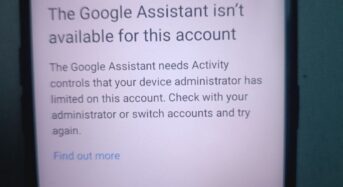
If this message appears on your smartphone while resetting your device or during the setup process, and you’re unsure how to resolve it, here is the solution: After doing this,…
Here’s how to tell: 1. On the Lock Screen • When you plug in the charger, you’ll briefly see a large battery icon appear in the middle of the screen…
Here’s what to do, step by step Step 1: Charge your iPad • Plug your iPad into a working charger and cable. • Make sure you’re using an Apple-certified (MFi)…
Requirements • A mobile number linked with Aadhaar • An active DigiLocker account (create one on the DigiLocker website/app if you don’t have it) • The official MyGov Helpdesk WhatsApp…
The message “iPhone Findable After Power Off” means your iPhone can still be located with Find My iPhone even if it’s turned off or runs out of battery. Apple introduced…
Passport renewal online: 1. Visit the Passport Seva Online Portal: https://www.passportindia.gov.in. 2. Click on “Fresh / Re-issue of Ordinary Passport.” 3. Select “Register Now” if you are a first-time user.…